Settings
In MoFood, there are serveral quality of life features that can help you throughout your MoFood journey. Some of this settings can be configured on/off in the MoFood setting. You can visit this menu in /food -> Player Profile -> Settings.
Enchant Settings
Settings related to enchantments.
Anonymous Charity
Hides your name on the charity message when you triggers the charity enchantment.
Enabled

Disabled

Hide Transmutation Alert
Hides the message that appears when you triggers the transmutation enchantment.

Hide Green Touch Alert
Hides the message that appears when you triggers the green touch enchantment.

Crop Setting
Settings related to crop.
Growth Message
Tells you the growth stage of a crop by right clicking it.
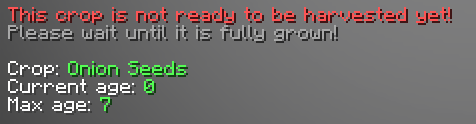
Seed Breaking
Will stop you from breaking seeds.
show example gif on & off
Cooking Setting
Settings related to cooking.
Keep Buckets
Will drop buckets on the ground when using them in crafting!
show example gif on & off
Auto Deposit Condiments
Will automatically deposit condiments when crafted.
show example gif on & off
Ingredient Settings
Settings related to ingredient.
Auto Pickup
Automatically picks-up harested ingredients.
show example gif on & off
Misc Settings
Settings that do not fit any category.
show example gif on & off
Delivery Notice Alert
Will stop the alert for new deliveries from appearing.
show example gif on & off
Purchace Warning
Will stop the warning from appearing when purchasing items.
show example gif on & off, and what in which shop does this rule apply to
Use All Buckets
When milking a cow with empty buckets bought from the Ingredient Shop it will also use the rest of it in your inventory.
show example gif on & off